Metadata-Version: 2.4
Name: paddlex
Version: 3.5.1
Summary: Low-code development tool based on PaddlePaddle.
Author: PaddlePaddle Authors
Author-email:
License: Apache-2.0
Keywords: paddlepaddle
Classifier: Development Status :: 4 - Beta
Classifier: Intended Audience :: Developers
Classifier: Intended Audience :: Education
Classifier: Intended Audience :: Science/Research
Classifier: Programming Language :: Python :: 3.8
Classifier: Programming Language :: Python :: 3.9
Classifier: Programming Language :: Python :: 3.10
Classifier: Programming Language :: Python :: 3.11
Classifier: Programming Language :: Python :: 3.12
Classifier: Programming Language :: Python :: 3.13
Classifier: Topic :: Scientific/Engineering
Classifier: Topic :: Scientific/Engineering :: Mathematics
Classifier: Topic :: Scientific/Engineering :: Artificial Intelligence
Classifier: Topic :: Software Development
Classifier: Topic :: Software Development :: Libraries
Classifier: Topic :: Software Development :: Libraries :: Python Modules
Requires-Python: >=3.8
Description-Content-Type: text/markdown
License-File: LICENSE
Requires-Dist: aistudio-sdk>=0.3.5
Requires-Dist: chardet
Requires-Dist: colorlog
Requires-Dist: filelock
Requires-Dist: huggingface-hub
Requires-Dist: modelscope<1.29.2,>=1.28.0; python_version == "3.8"
Requires-Dist: modelscope>=1.28.0; python_version >= "3.9"
Requires-Dist: numpy<2.4,>=1.24
Requires-Dist: packaging
Requires-Dist: pandas>=1.3
Requires-Dist: pillow
Requires-Dist: prettytable
Requires-Dist: py-cpuinfo
Requires-Dist: pydantic>=2
Requires-Dist: PyYAML==6.0.2
Requires-Dist: requests
Requires-Dist: ruamel.yaml
Requires-Dist: typing-extensions
Requires-Dist: ujson
Provides-Extra: cv
Requires-Dist: faiss-cpu; extra == "cv"
Requires-Dist: matplotlib; extra == "cv"
Requires-Dist: opencv-contrib-python==4.10.0.84; extra == "cv"
Requires-Dist: pycocotools<=2.0.8; extra == "cv"
Requires-Dist: pypdfium2>=4; extra == "cv"
Requires-Dist: scikit-image; extra == "cv"
Provides-Extra: multimodal
Requires-Dist: einops; extra == "multimodal"
Requires-Dist: ftfy; extra == "multimodal"
Requires-Dist: GPUtil>=1.4; extra == "multimodal"
Requires-Dist: Jinja2; extra == "multimodal"
Requires-Dist: opencv-contrib-python==4.10.0.84; extra == "multimodal"
Requires-Dist: pypdfium2>=4; extra == "multimodal"
Requires-Dist: regex; extra == "multimodal"
Requires-Dist: safetensors>=0.7.0; extra == "multimodal"
Requires-Dist: sentencepiece; extra == "multimodal"
Requires-Dist: tiktoken; extra == "multimodal"
Provides-Extra: ie
Requires-Dist: ftfy; extra == "ie"
Requires-Dist: imagesize; extra == "ie"
Requires-Dist: langchain<1.0,>=0.2; extra == "ie"
Requires-Dist: langchain-community<1.0,>=0.2; extra == "ie"
Requires-Dist: langchain-core; extra == "ie"
Requires-Dist: langchain-openai<1.0,>=0.1; extra == "ie"
Requires-Dist: langchain-text-splitters<1.0,>=0.2; extra == "ie"
Requires-Dist: lxml; extra == "ie"
Requires-Dist: openai>=1.63; extra == "ie"
Requires-Dist: opencv-contrib-python==4.10.0.84; extra == "ie"
Requires-Dist: openpyxl; extra == "ie"
Requires-Dist: premailer; extra == "ie"
Requires-Dist: pyclipper; extra == "ie"
Requires-Dist: pypdfium2>=4; extra == "ie"
Requires-Dist: scikit-learn; extra == "ie"
Requires-Dist: scipy; extra == "ie"
Requires-Dist: shapely; extra == "ie"
Requires-Dist: tokenizers>=0.19; extra == "ie"
Provides-Extra: trans
Requires-Dist: beautifulsoup4; extra == "trans"
Requires-Dist: ftfy; extra == "trans"
Requires-Dist: imagesize; extra == "trans"
Requires-Dist: lxml; extra == "trans"
Requires-Dist: openai>=1.63; extra == "trans"
Requires-Dist: opencv-contrib-python==4.10.0.84; extra == "trans"
Requires-Dist: openpyxl; extra == "trans"
Requires-Dist: premailer; extra == "trans"
Requires-Dist: pyclipper; extra == "trans"
Requires-Dist: pypdfium2>=4; extra == "trans"
Requires-Dist: python-docx; extra == "trans"
Requires-Dist: scikit-learn; extra == "trans"
Requires-Dist: scipy; extra == "trans"
Requires-Dist: shapely; extra == "trans"
Requires-Dist: tokenizers>=0.19; extra == "trans"
Provides-Extra: ocr-core
Requires-Dist: imagesize; extra == "ocr-core"
Requires-Dist: opencv-contrib-python==4.10.0.84; extra == "ocr-core"
Requires-Dist: pyclipper; extra == "ocr-core"
Requires-Dist: pypdfium2>=4; extra == "ocr-core"
Requires-Dist: python-bidi; extra == "ocr-core"
Requires-Dist: shapely; extra == "ocr-core"
Provides-Extra: ocr
Requires-Dist: beautifulsoup4; extra == "ocr"
Requires-Dist: einops; extra == "ocr"
Requires-Dist: ftfy; extra == "ocr"
Requires-Dist: imagesize; extra == "ocr"
Requires-Dist: Jinja2; extra == "ocr"
Requires-Dist: latex2mathml; extra == "ocr"
Requires-Dist: lxml; extra == "ocr"
Requires-Dist: opencv-contrib-python==4.10.0.84; extra == "ocr"
Requires-Dist: openpyxl; extra == "ocr"
Requires-Dist: premailer; extra == "ocr"
Requires-Dist: pyclipper; extra == "ocr"
Requires-Dist: pypdfium2>=4; extra == "ocr"
Requires-Dist: python-bidi; extra == "ocr"
Requires-Dist: regex; extra == "ocr"
Requires-Dist: safetensors>=0.7.0; extra == "ocr"
Requires-Dist: scikit-learn; extra == "ocr"
Requires-Dist: scipy; extra == "ocr"
Requires-Dist: sentencepiece; extra == "ocr"
Requires-Dist: shapely; extra == "ocr"
Requires-Dist: tiktoken; extra == "ocr"
Requires-Dist: tokenizers>=0.19; extra == "ocr"
Provides-Extra: speech
Requires-Dist: ftfy; extra == "speech"
Requires-Dist: jieba; extra == "speech"
Requires-Dist: Jinja2; extra == "speech"
Requires-Dist: OpenCC; extra == "speech"
Requires-Dist: pypinyin; extra == "speech"
Requires-Dist: regex; extra == "speech"
Requires-Dist: soundfile; extra == "speech"
Requires-Dist: tqdm; extra == "speech"
Provides-Extra: ts
Requires-Dist: chinese-calendar; extra == "ts"
Requires-Dist: joblib; extra == "ts"
Requires-Dist: matplotlib; extra == "ts"
Requires-Dist: scikit-learn; extra == "ts"
Provides-Extra: video
Requires-Dist: decord==0.6.0; ((platform_machine == "x86_64" or platform_machine == "AMD64") and sys_platform != "darwin") and extra == "video"
Requires-Dist: opencv-contrib-python==4.10.0.84; extra == "video"
Provides-Extra: base
Requires-Dist: beautifulsoup4; extra == "base"
Requires-Dist: chinese-calendar; extra == "base"
Requires-Dist: decord==0.6.0; ((platform_machine == "x86_64" or platform_machine == "AMD64") and sys_platform != "darwin") and extra == "base"
Requires-Dist: einops; extra == "base"
Requires-Dist: faiss-cpu; extra == "base"
Requires-Dist: ftfy; extra == "base"
Requires-Dist: GPUtil>=1.4; extra == "base"
Requires-Dist: imagesize; extra == "base"
Requires-Dist: jieba; extra == "base"
Requires-Dist: Jinja2; extra == "base"
Requires-Dist: joblib; extra == "base"
Requires-Dist: langchain<1.0,>=0.2; extra == "base"
Requires-Dist: langchain-community<1.0,>=0.2; extra == "base"
Requires-Dist: langchain-core; extra == "base"
Requires-Dist: langchain-openai<1.0,>=0.1; extra == "base"
Requires-Dist: langchain-text-splitters<1.0,>=0.2; extra == "base"
Requires-Dist: latex2mathml; extra == "base"
Requires-Dist: lxml; extra == "base"
Requires-Dist: matplotlib; extra == "base"
Requires-Dist: openai>=1.63; extra == "base"
Requires-Dist: OpenCC; extra == "base"
Requires-Dist: opencv-contrib-python==4.10.0.84; extra == "base"
Requires-Dist: openpyxl; extra == "base"
Requires-Dist: premailer; extra == "base"
Requires-Dist: pyclipper; extra == "base"
Requires-Dist: pycocotools<=2.0.8; extra == "base"
Requires-Dist: pypdfium2>=4; extra == "base"
Requires-Dist: pypinyin; extra == "base"
Requires-Dist: python-bidi; extra == "base"
Requires-Dist: python-docx; extra == "base"
Requires-Dist: regex; extra == "base"
Requires-Dist: safetensors>=0.7.0; extra == "base"
Requires-Dist: scikit-image; extra == "base"
Requires-Dist: scikit-learn; extra == "base"
Requires-Dist: scipy; extra == "base"
Requires-Dist: sentencepiece; extra == "base"
Requires-Dist: shapely; extra == "base"
Requires-Dist: soundfile; extra == "base"
Requires-Dist: tiktoken; extra == "base"
Requires-Dist: tokenizers>=0.19; extra == "base"
Requires-Dist: tqdm; extra == "base"
Provides-Extra: genai-client
Requires-Dist: openai>=1.63; extra == "genai-client"
Provides-Extra: genai-sglang-server
Requires-Dist: einops; extra == "genai-sglang-server"
Requires-Dist: sglang[all]==0.5.2; extra == "genai-sglang-server"
Requires-Dist: torch==2.8.0; extra == "genai-sglang-server"
Requires-Dist: transformers; extra == "genai-sglang-server"
Provides-Extra: genai-vllm-server
Requires-Dist: einops; extra == "genai-vllm-server"
Requires-Dist: torch==2.8.0; extra == "genai-vllm-server"
Requires-Dist: transformers<5.0.0; extra == "genai-vllm-server"
Requires-Dist: uvloop; extra == "genai-vllm-server"
Requires-Dist: vllm==0.10.2; extra == "genai-vllm-server"
Provides-Extra: paddle2onnx
Requires-Dist: paddle2onnx==2.1.0; extra == "paddle2onnx"
Provides-Extra: serving
Requires-Dist: aiohttp>=3.9; extra == "serving"
Requires-Dist: bce-python-sdk>=0.9; extra == "serving"
Requires-Dist: fastapi>=0.110; extra == "serving"
Requires-Dist: filetype>=1.2; extra == "serving"
Requires-Dist: opencv-contrib-python==4.10.0.84; extra == "serving"
Requires-Dist: pypdfium2>=4; extra == "serving"
Requires-Dist: starlette>=0.36; extra == "serving"
Requires-Dist: uvicorn>=0.16; extra == "serving"
Requires-Dist: yarl>=1.9; extra == "serving"
Dynamic: author
Dynamic: classifier
Dynamic: description
Dynamic: description-content-type
Dynamic: keywords
Dynamic: license
Dynamic: license-file
Dynamic: provides-extra
Dynamic: requires-dist
Dynamic: requires-python
Dynamic: summary





## 🔍 简介
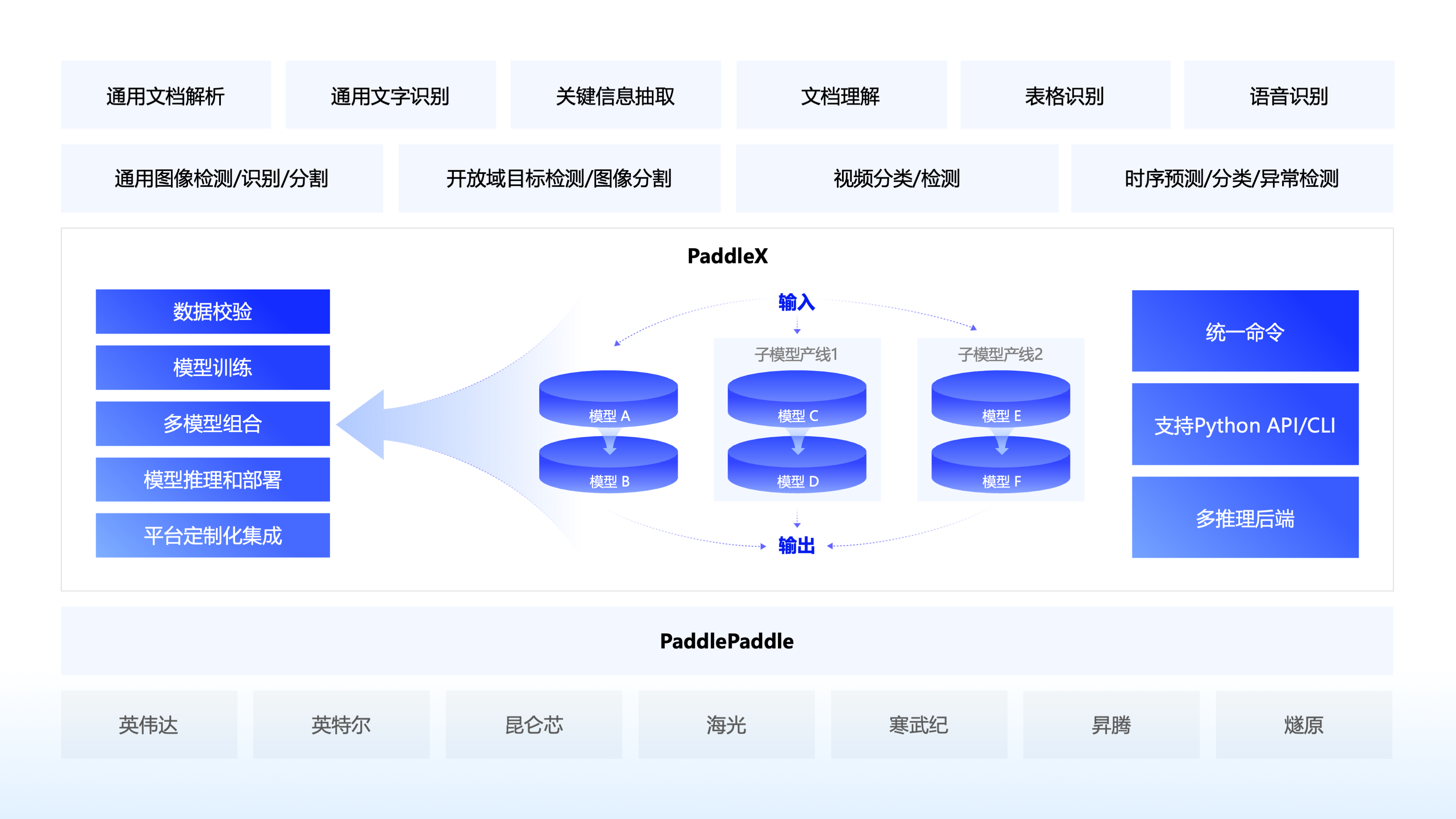
PaddleX 3.0 是基于飞桨框架构建的低代码开发工具,它集成了众多**开箱即用的预训练模型**,可以实现模型从训练到推理的**全流程开发**,支持国内外**多款主流硬件**,助力AI 开发者进行产业实践。
## 🌟 特性
🎨 **模型丰富一键调用**:将覆盖文本图像智能分析、OCR、目标检测、时序预测等多个关键领域的 **200+ 飞桨模型**整合为 **33 条模型产线**,通过极简的 Python API 一键调用,快速体验模型效果。同时支持 **39 种单功能模块**,方便开发者进行模型组合使用。
🚀 **提高效率降低门槛**:实现基于统一命令和图形界面的模型**全流程开发**,打造大小模型结合、大模型半监督学习和多模型融合的[**8 条特色模型产线**](https://aistudio.baidu.com/intro/paddlex),大幅度降低迭代模型的成本。
🌐 **多种场景灵活部署**:支持**高性能推理**、**服务化部署**和**端侧部署**等多种部署方式,确保不同应用场景下模型的高效运行和快速响应。
🔧 **主流硬件高效支持**:支持英伟达 GPU、昆仑芯、昇腾和寒武纪等**多种主流硬件**的无缝切换,确保高效运行。
## 📣 近期更新
🔥🔥 **2025.10.16,发布 PaddleX v3.3.0**,新增能力如下:
- **支持PaddleOCR-VL、PP-OCRv5多语种模型的推理部署能力。**
🔥🔥 **2025.8.20,发布 PaddleX v3.2.0**,新增能力如下:
- **部署能力升级:**
- **全面支持飞桨框架 3.1.0 和 3.1.1 版本。**
- **高性能推理支持 CUDA 12,可使用 Paddle Inference、ONNX Runtime 后端推理。**
- **高稳定性服务化部署方案全面开源,支持用户根据需求对 Docker 镜像和 SDK 进行定制化修改。**
- 高稳定性服务化部署方案支持通过手动构造HTTP请求的方式调用,该方式允许客户端代码使用任意编程语言编写。
- **重要模型新增:**
- 新增 PP-OCRv5 英文、泰文、希腊文识别模型的训练、推理、部署。**其中 PP-OCRv5 英文模型较 PP-OCRv5 主模型在英文场景提升 11%,泰文识别模型精度 82.68%,希腊文识别模型精度 89.28%。**
- **Benchmark升级:**
- **全部产线支持产线细粒度 benchmark,能够测量产线端到端推理时间以及逐层、逐模块的耗时数据,可用于辅助产线性能分析。**
- **在文档中补充各产线常用配置在主流硬件上的关键指标,包括推理耗时和内存占用等,为用户部署提供参考。**
- **Bug修复:**
- 修复了当输入图片文件格式不合法时,导致递归调用的问题。
- 修复了 PP-DocTranslation 和 PP-StructureV3 产线配置文件中图表识别、印章识别、文档预处理参数设置不生效的问题。
- 修复 PDF 文件在推理结束后未正确关闭的问题。
- **其他升级:**
- **支持 Windows 用户使用英伟达 50 系显卡,可根据安装文档安装对应版本的 paddle 框架。**
- **PP-OCR 系列模型支持返回单文字坐标。**
- 将 `PaddlePredictorOption` 中的 `model_name` 参数移至 `PaddleInfer` 中,改善了用户易用性。
- 重构了官方模型下载逻辑,新增了 AIStudio、ModelScope 等多模型托管平台。
🔥🔥 **2025.6.28,发布 PaddleX v3.1.0**,新增能力如下:
- **重要模型:**
- **新增PP-OCRv5多语种文本识别模型**,支持法语、西班牙语、葡萄牙语、俄语、韩语等37种语言的文字识别模型的训推流程。**平均精度涨幅超30%。**
- 升级PP-StructureV3中的**PP-Chart2Table模型**,图表转表能力进一步升级,在内部自建测评集合上指标(RMS-F1)**提升9.36个百分点(71.24% -> 80.60%)**
- **重要产线:**
- 新增基于PP-StructureV3和ERNIE 4.5 Turbo的**文档翻译产线PP-DocTranslation,支持翻译Markdown文档、各种复杂版式的PDF文档和文档图像,结果保存为Markdown格式文档。**
🔥🔥 **2025.5.20,发布 PaddleX v3.0.0**,相比PaddleX v2.x,核心升级如下:
**丰富的模型库:**
- **模型丰富:** PaddleX3.0 包含270+模型,涵盖了图像(视频)分类/检测/分割、OCR、语音识别、时序等多种场景。
- **方案成熟:** PaddleX3.0 基于丰富的模型库,**提供了通用文档解析、关键信息抽取、文档理解、表格识别、通用图像识别等多种重要且成熟的AI解决方案。**
**统一推理接口,重构部署能力:**
- **推理接口标准化**,降低不同种类模型带来的API接口差异,减少用户学习成本,提升企业落地效率。
- **提供多模型组合能力**,复杂任务可以通过不同的模型方便地进行组合使用,实现1+1>2 的能力。
- **部署能力升级,多种模型部署可以使用统一的命令管理,支持多卡推理,支持多卡多实例服务化部署。**
**全面适配飞桨框架3.0:**
- **全面适配飞桨框架3.0新特性:** 支持编译器训练,训练命令通过追加 `-o Global.dy2st=True` 即可开启编译器训练,在 GPU 上,多数模型训练速度可提升 10% 以上,少部分模型训练速度可以提升 30% 以上。推理方面,模型整体适配飞桨 3.0 中间表示技术(PIR),拥有更加灵活的扩展能力和兼容性,静态图模型存储文件名由 `xxx.pdmodel` 改为 `xxx.json`。
- **全面支持 ONNX 格式模型:** 支持通过Paddle2ONNX插件转换模型格式。
**重磅能力支撑:**
- **支撑PP-OCRv5的串联逻辑和多硬件推理、多后端推理、服务化部署能力。**
- **支撑PP-StructureV3的复杂模型串联和并联的逻辑,首次串联并联共15个模型,实现多模型协同的复杂pipeline。精度在 OmniDocBench 榜单上达到 SOTA 水平。**
- **支撑PP-ChatOCRv4的大模型串联逻辑,结合文心大模型4.5Turbo,结合新增的PP-DocBee2,关键信息抽取精度相比上一代提升15.7个百分点。**
**多硬件支持:**
- **整体支持英伟达、英特尔、苹果M系列、昆仑芯、昇腾、寒武纪、海光、燧原等芯片的训练和推理。**
- **在昇腾上,全面适配的模型达到200个,** 支持OM高性能推理的模型达到21个。此外支持PP-OCRv5、PP-StructureV3等重要模型方案。
- 在昆仑芯上支持重要分类、检测、OCR类模型(含PP-OCRv5)。
## 🔠 模型产线说明
**PaddleX 致力于实现产线级别的模型训练、推理与部署。模型产线是指一系列预定义好的、针对特定AI任务的开发流程,其中包含能够独立完成某类任务的单模型(单功能模块)组合。**
## 📊 能力支持
PaddleX的各个产线均支持本地**快速推理**,部分模型支持在[AI Studio星河社区](https://aistudio.baidu.com/overview)上进行**在线体验**,您可以快速体验各个产线的预训练模型效果,如果您对产线的预训练模型效果满意,可以直接对产线进行[高性能推理](https://paddlepaddle.github.io/PaddleX/latest/pipeline_deploy/high_performance_inference.html)/[服务化部署](https://paddlepaddle.github.io/PaddleX/latest/pipeline_deploy/serving.html)/[端侧部署](https://paddlepaddle.github.io/PaddleX/latest/pipeline_deploy/on_device_deployment.html),如果不满意,您也可以使用产线的**二次开发**能力,提升效果。完整的产线开发流程请参考[PaddleX产线使用概览](https://paddlepaddle.github.io/PaddleX/latest/pipeline_usage/pipeline_develop_guide.html)或各产线使用[教程](#-文档)。
此外,PaddleX在[AI Studio星河社区](https://aistudio.baidu.com/overview)为开发者提供了基于[云端图形化开发界面](https://aistudio.baidu.com/pipeline/mine)的全流程开发工具, 点击【创建产线】,选择对应的任务场景和模型产线,就可以开启全流程开发。详细请参考[教程《零门槛开发产业级AI模型》](https://aistudio.baidu.com/practical/introduce/546656605663301)
> ❗注:以上功能均基于 GPU/CPU 实现。PaddleX 还可在昆仑芯、昇腾、寒武纪和海光等主流硬件上进行快速推理和二次开发。下表详细列出了模型产线的支持情况,具体支持的模型列表请参阅[模型列表(昆仑芯XPU)](https://paddlepaddle.github.io/PaddleX/latest/support_list/model_list_xpu.html)/[模型列表(昇腾NPU)](https://paddlepaddle.github.io/PaddleX/latest/support_list/model_list_npu.html)/[模型列表(寒武纪MLU)](https://paddlepaddle.github.io/PaddleX/latest/support_list/model_list_mlu.html)/[模型列表(海光DCU)](https://paddlepaddle.github.io/PaddleX/latest/support_list/model_list_dcu.html)。我们正在适配更多的模型,并在主流硬件上推动高性能和服务化部署的实施。
🔥🔥 **国产化硬件能力支持**
| 模型产线 |
昇腾 910B |
昆仑芯 R200/R300 |
寒武纪 MLU370X8 |
海光 Z100/K100AI |
| 通用OCR |
✅ |
✅ |
✅ |
✅ |
| 通用表格识别 |
✅ |
🚧 |
🚧 |
🚧 |
| 通用目标检测 |
✅ |
✅ |
✅ |
✅ |
| 通用实例分割 |
✅ |
🚧 |
✅ |
🚧 |
| 通用图像分类 |
✅ |
✅ |
✅ |
✅ |
| 通用语义分割 |
✅ |
✅ |
✅ |
✅ |
| 时序预测 |
✅ |
✅ |
✅ |
✅ |
| 时序异常检测 |
✅ |
🚧 |
🚧 |
🚧 |
| 时序分类 |
✅ |
🚧 |
🚧 |
🚧 |
| 图像多标签分类 |
✅ |
🚧 |
🚧 |
✅ |
| 行人属性识别 |
✅ |
🚧 |
🚧 |
🚧 |
| 车辆属性识别 |
✅ |
🚧 |
🚧 |
🚧 |
| 通用图像识别 |
✅ |
🚧 |
✅ |
✅ |
| 印章文本识别 |
✅ |
🚧 |
🚧 |
🚧 |
| 图像异常检测 |
✅ |
✅ |
✅ |
✅ |
| 人脸识别 |
✅ |
✅ |
✅ |
✅ |
## ⏭️ 快速开始
### 🛠️ 安装
> ❗在安装 PaddleX 之前,请确保您已具备基本的 **Python 运行环境**(注:目前支持 Python 3.8 至 Python 3.13)。PaddleX 3.0.x 版本依赖的 PaddlePaddle 版本为 3.0.0 及以上版本,请在使用前务必保证版本的对应关系。
* **安装 PaddlePaddle**
```bash
# CPU 版本
python -m pip install paddlepaddle==3.3.0 -i https://www.paddlepaddle.org.cn/packages/stable/cpu/
# GPU 版本,需显卡驱动程序版本 ≥450.80.02(Linux)或 ≥452.39(Windows)
python -m pip install paddlepaddle-gpu==3.3.0 -i https://www.paddlepaddle.org.cn/packages/stable/cu118/
# GPU 版本,需显卡驱动程序版本 ≥550.54.14(Linux)或 ≥550.54.14(Windows)
python -m pip install paddlepaddle-gpu==3.3.0 -i https://www.paddlepaddle.org.cn/packages/stable/cu126/
```
> ❗无需关注物理机上的 CUDA 版本,只需关注显卡驱动程序版本。更多飞桨 Wheel 版本信息,请参考[飞桨官网](https://www.paddlepaddle.org.cn/install/quick?docurl=/documentation./docs/zh/install/pip/linux-pip.html)。
* **安装PaddleX**
```bash
pip install "paddlex[base]"
```
> ❗ 更多安装方式参考 [PaddleX 安装教程](https://paddlepaddle.github.io/PaddleX/latest/installation/installation.html)
### 💻 命令行使用
一行命令即可快速体验产线效果,统一的命令行格式为:
```bash
paddlex --pipeline [产线名称] --input [输入图片] --device [运行设备]
```
PaddleX的每一条产线对应特定的参数,您可以在各自的产线文档中查看具体的参数说明。每条产线需指定必要的三个参数:
* `pipeline`:产线名称或产线配置文件
* `input`:待处理的输入文件(如图片)的本地路径、目录或 URL
* `device`:使用的硬件设备及序号(例如`gpu:0`表示使用第 0 块 GPU),也可选择使用 NPU(`npu:0`)、 XPU(`xpu:0`)、CPU(`cpu`)等。
以通用 OCR 产线为例:
```bash
paddlex --pipeline OCR \
--input https://paddle-model-ecology.bj.bcebos.com/paddlex/imgs/demo_image/general_ocr_002.png \
--use_doc_orientation_classify False \
--use_doc_unwarping False \
--use_textline_orientation False \
--save_path ./output \
--device gpu:0
```
👉 点击查看运行结果
```bash
{'res': {'input_path': 'general_ocr_002.png', 'page_index': None, 'model_settings': {'use_doc_preprocessor': False, 'use_textline_orientation': False}, 'doc_preprocessor_res': {'input_path': None, 'model_settings': {'use_doc_orientation_classify': True, 'use_doc_unwarping': False}, 'angle': 0},'dt_polys': [array([[ 3, 10],
[82, 10],
[82, 33],
[ 3, 33]], dtype=int16), ...], 'text_det_params': {'limit_side_len': 960, 'limit_type': 'max', 'thresh': 0.3, 'box_thresh': 0.6, 'unclip_ratio': 2.0}, 'text_type': 'general', 'textline_orientation_angles': [-1, ...], 'text_rec_score_thresh': 0.0, 'rec_texts': ['www.99*', ...], 'rec_scores': [0.8980069160461426, ...], 'rec_polys': [array([[ 3, 10],
[82, 10],
[82, 33],
[ 3, 33]], dtype=int16), ...], 'rec_boxes': array([[ 3, 10, 82, 33], ...], dtype=int16)}}
```
可视化结果如下:
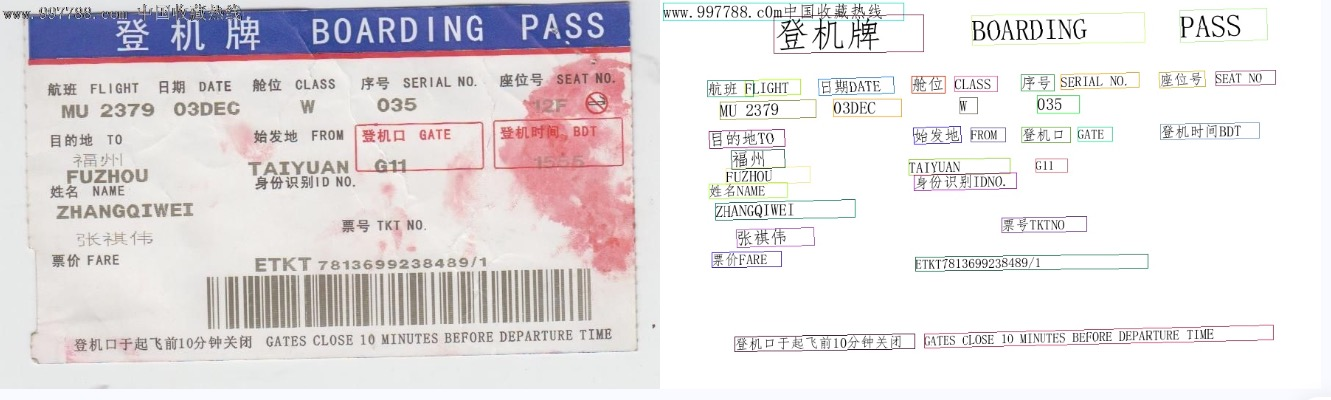
其他产线的命令行使用,只需将 `pipeline` 参数调整为相应产线的名称,参数调整为对应的产线的参数即可。下面列出了每个产线对应的命令:
👉 更多产线的命令行使用
| 产线名称 | 使用命令 |
|--------------------|---------------------------------------------------------------------------------------------------------------------------------------------------------------------------------------------|
| 通用图像分类 | `paddlex --pipeline image_classification --input https://paddle-model-ecology.bj.bcebos.com/paddlex/imgs/demo_image/general_image_classification_001.jpg --device gpu:0 --save_path ./output/` |
| 通用目标检测 | `paddlex --pipeline object_detection --input https://paddle-model-ecology.bj.bcebos.com/paddlex/imgs/demo_image/general_object_detection_002.png --threshold 0.5 --save_path ./output/ --device gpu:0` |
| 通用实例分割 | `paddlex --pipeline instance_segmentation --input https://paddle-model-ecology.bj.bcebos.com/paddlex/imgs/demo_image/general_instance_segmentation_004.png --threshold 0.5 --save_path ./output --device gpu:0` |
| 通用语义分割 | `paddlex --pipeline semantic_segmentation --input https://paddle-model-ecology.bj.bcebos.com/paddlex/PaddleX3.0/application/semantic_segmentation/makassaridn-road_demo.png --target_size -1 --save_path ./output --device gpu:0` |
| 图像多标签分类 | `paddlex --pipeline image_multilabel_classification --input https://paddle-model-ecology.bj.bcebos.com/paddlex/imgs/demo_image/general_image_classification_001.jpg --save_path ./output --device gpu:0` |
| 小目标检测 | `paddlex --pipeline small_object_detection --input https://paddle-model-ecology.bj.bcebos.com/paddlex/imgs/demo_image/small_object_detection.jpg --threshold 0.5 --save_path ./output --device gpu:0` |
| 图像异常检测 | `paddlex --pipeline anomaly_detection --input https://paddle-model-ecology.bj.bcebos.com/paddlex/imgs/demo_image/uad_grid.png --save_path ./output --device gpu:0` |
| 行人属性识别 | `paddlex --pipeline pedestrian_attribute_recognition --input https://paddle-model-ecology.bj.bcebos.com/paddlex/imgs/demo_image/pedestrian_attribute_002.jpg --save_path ./output/ --device gpu:0` |
| 车辆属性识别 | `paddlex --pipeline vehicle_attribute_recognition --input https://paddle-model-ecology.bj.bcebos.com/paddlex/imgs/demo_image/vehicle_attribute_002.jpg --save_path ./output/ --device gpu:0` |
| 3D多模态融合检测 | `paddlex --pipeline 3d_bev_detection --input https://paddle-model-ecology.bj.bcebos.com/paddlex/det_3d/demo_det_3d/nuscenes_demo_infer.tar --device gpu:0 --save_path ./output/` |
| 人体关键点检测 | `paddlex --pipeline human_keypoint_detection --input https://paddle-model-ecology.bj.bcebos.com/paddlex/imgs/demo_image/keypoint_detection_001.jpg --det_threshold 0.5 --save_path ./output/ --device gpu:0` |
| 开放词汇检测 | `paddlex --pipeline open_vocabulary_detection --input https://paddle-model-ecology.bj.bcebos.com/paddlex/imgs/demo_image/open_vocabulary_detection.jpg --prompt "bus . walking man . rearview mirror ." --thresholds "{'text_threshold': 0.25, 'box_threshold': 0.3}" --save_path ./output --device gpu:0` |
| 开放词汇分割 | `paddlex --pipeline open_vocabulary_segmentation --input https://paddle-model-ecology.bj.bcebos.com/paddlex/imgs/demo_image/open_vocabulary_segmentation.jpg --prompt_type box --prompt "[[112.9,118.4,513.8,382.1],[4.6,263.6,92.2,336.6],[592.4,260.9,607.2,294.2]]" --save_path ./output --device gpu:0` |
| 旋转目标检测 | `paddlex --pipeline rotated_object_detection --input https://paddle-model-ecology.bj.bcebos.com/paddlex/imgs/demo_image/rotated_object_detection_001.png --threshold 0.5 --save_path ./output --device gpu:0` |
| 通用OCR | `paddlex --pipeline OCR --input https://paddle-model-ecology.bj.bcebos.com/paddlex/imgs/demo_image/general_ocr_002.png --use_doc_orientation_classify False --use_doc_unwarping False --use_textline_orientation False --save_path ./output --device gpu:0` |
| 文档图像预处理 | `paddlex --pipeline doc_preprocessor --input https://paddle-model-ecology.bj.bcebos.com/paddlex/demo_image/doc_test_rotated.jpg --use_doc_orientation_classify True --use_doc_unwarping True --save_path ./output --device gpu:0` |
| 通用表格识别 | `paddlex --pipeline table_recognition --input https://paddle-model-ecology.bj.bcebos.com/paddlex/imgs/demo_image/table_recognition.jpg --save_path ./output --device gpu:0` |
| 通用表格识别v2 | `paddlex --pipeline table_recognition_v2 --input https://paddle-model-ecology.bj.bcebos.com/paddlex/imgs/demo_image/table_recognition.jpg --save_path ./output --device gpu:0` |
| 通用版面解析 | `paddlex --pipeline layout_parsing --input https://paddle-model-ecology.bj.bcebos.com/paddlex/imgs/demo_image/demo_paper.png --use_doc_orientation_classify False --use_doc_unwarping False --use_textline_orientation False --save_path ./output --device gpu:0` |
| 通用版面解析v3 | `paddlex --pipeline PP-StructureV3 --input https://paddle-model-ecology.bj.bcebos.com/paddlex/imgs/demo_image/pp_structure_v3_demo.png --use_doc_orientation_classify False --use_doc_unwarping False --use_textline_orientation False --save_path ./output --device gpu:0` |
| 公式识别 | `paddlex --pipeline formula_recognition --input https://paddle-model-ecology.bj.bcebos.com/paddlex/demo_image/general_formula_recognition.png --use_layout_detection True --use_doc_orientation_classify False --use_doc_unwarping False --layout_threshold 0.5 --layout_nms True --layout_unclip_ratio 1.0 --layout_merge_bboxes_mode large --save_path ./output --device gpu:0` |
| 印章文本识别 | `paddlex --pipeline seal_recognition --input https://paddle-model-ecology.bj.bcebos.com/paddlex/imgs/demo_image/seal_text_det.png --use_doc_orientation_classify False --use_doc_unwarping False --device gpu:0 --save_path ./output` |
| 时序预测 | `paddlex --pipeline ts_forecast --input https://paddle-model-ecology.bj.bcebos.com/paddlex/ts/demo_ts/ts_fc.csv --device gpu:0 --save_path ./output` |
| 时序异常检测 | `paddlex --pipeline ts_anomaly_detection --input https://paddle-model-ecology.bj.bcebos.com/paddlex/ts/demo_ts/ts_ad.csv --device gpu:0 --save_path ./output` |
| 时序分类 | `paddlex --pipeline ts_classification --input https://paddle-model-ecology.bj.bcebos.com/paddlex/ts/demo_ts/ts_cls.csv --device gpu:0 --save_path ./output` |
| 多语种语音识别 | `paddlex --pipeline multilingual_speech_recognition --input https://paddlespeech.bj.bcebos.com/PaddleAudio/zh.wav --save_path ./output --device gpu:0` |
| 通用视频分类 | `paddlex --pipeline video_classification --input https://paddle-model-ecology.bj.bcebos.com/paddlex/videos/demo_video/general_video_classification_001.mp4 --topk 5 --save_path ./output --device gpu:0` |
| 通用视频检测 | `paddlex --pipeline video_detection --input https://paddle-model-ecology.bj.bcebos.com/paddlex/videos/demo_video/HorseRiding.avi --device gpu:0 --save_path ./output` |
### 📝 Python 脚本使用
几行代码即可完成产线的快速推理,统一的 Python 脚本格式如下:
```python
from paddlex import create_pipeline
pipeline = create_pipeline(pipeline=[产线名称])
output = pipeline.predict([输入图片名称])
for res in output:
res.print()
res.save_to_img("./output/")
res.save_to_json("./output/")
```
执行了如下几个步骤:
* `create_pipeline()` 实例化产线对象
* 传入图片并调用产线对象的 `predict()` 方法进行推理预测
* 对预测结果进行处理
其他产线的 Python 脚本使用,只需将 `create_pipeline()` 方法的 `pipeline` 参数调整为相应产线的名称,参数调整为对应的产线的参数即可。下面列出了每个产线对应的参数名称及详细的使用解释:
👉 更多产线的Python脚本使用
| 产线名称 | 对应参数 | 详细说明 |
|--------------------|------------------------------------|------------------------------------------------------------------------------------------------------------------------------------------------------------------|
| 文档场景信息抽取v4 | `PP-ChatOCRv4-doc` | [文档场景信息抽取v4产线Python脚本使用说明](https://paddlepaddle.github.io/PaddleX/latest/pipeline_usage/tutorials/information_extraction_pipelines/document_scene_information_extraction_v4.html#22-本地体验) |
| 文档场景信息抽取v3 | `PP-ChatOCRv3-doc` | [文档场景信息抽取v3产线Python脚本使用说明](https://paddlepaddle.github.io/PaddleX/latest/pipeline_usage/tutorials/information_extraction_pipelines/document_scene_information_extraction_v3.html#22-本地体验) |
| 通用图像分类 | `image_classification` | [通用图像分类产线Python脚本使用说明](https://paddlepaddle.github.io/PaddleX/latest/pipeline_usage/tutorials/cv_pipelines/image_classification.html#222-python脚本方式集成) |
| 通用目标检测 | `object_detection` | [通用目标检测产线Python脚本使用说明](https://paddlepaddle.github.io/PaddleX/latest/pipeline_usage/tutorials/cv_pipelines/object_detection.html#222-python脚本方式集成) |
| 通用实例分割 | `instance_segmentation` | [通用实例分割产线Python脚本使用说明](https://paddlepaddle.github.io/PaddleX/latest/pipeline_usage/tutorials/cv_pipelines/instance_segmentation.html#222-python脚本方式集成) |
| 通用语义分割 | `semantic_segmentation` | [通用语义分割产线Python脚本使用说明](https://paddlepaddle.github.io/PaddleX/latest/pipeline_usage/tutorials/cv_pipelines/semantic_segmentation.html#222-python脚本方式集成) |
| 图像多标签分类 | `multi_label_image_classification` | [图像多标签分类产线Python脚本使用说明](https://paddlepaddle.github.io/PaddleX/latest/pipeline_usage/tutorials/cv_pipelines/image_multi_label_classification.html#22-python脚本方式集成) |
| 小目标检测 | `small_object_detection` | [小目标检测产线Python脚本使用说明](https://paddlepaddle.github.io/PaddleX/latest/pipeline_usage/tutorials/cv_pipelines/small_object_detection.html#22-python脚本方式集成) |
| 图像异常检测 | `anomaly_detection` | [图像异常检测产线Python脚本使用说明](https://paddlepaddle.github.io/PaddleX/latest/pipeline_usage/tutorials/cv_pipelines/image_anomaly_detection.html#22-python脚本方式集成) |
| 通用图像识别 | `PP-ShiTuV2` | [通用图像识别Python脚本使用说明](https://paddlepaddle.github.io/PaddleX/latest/pipeline_usage/tutorials/cv_pipelines/general_image_recognition.html#22-python脚本方式集成) |
| 人脸识别 | `face_recognition` | [人脸识别Python脚本使用说明](https://paddlepaddle.github.io/PaddleX/latest/pipeline_usage/tutorials/cv_pipelines/face_recognition.html#22-python脚本方式集成) |
| 车辆属性识别 | `vehicle_attribute_recognition` | [车辆属性识别产线Python脚本使用说明](https://paddlepaddle.github.io/PaddleX/latest/pipeline_usage/tutorials/cv_pipelines/vehicle_attribute_recognition.html#22-python脚本方式集成) |
| 行人属性识别 | `pedestrian_attribute_recognition` | [行人属性识别产线Python脚本使用说明](https://paddlepaddle.github.io/PaddleX/latest/pipeline_usage/tutorials/cv_pipelines/pedestrian_attribute_recognition.html#22-python脚本方式集成) |
| 3D多模态融合检测 | `3d_bev_detection` | [3D多模态融合检测产线Python脚本使用说明](https://paddlepaddle.github.io/PaddleX/latest/pipeline_usage/tutorials/cv_pipelines/3d_bev_detection.html#222-python脚本方式集成) |
| 人体关键点检测 | `human_keypoint_detection` | [人体关键点检测产线Python脚本使用说明](https://paddlepaddle.github.io/PaddleX/latest/pipeline_usage/tutorials/cv_pipelines/human_keypoint_detection.html#222-python脚本方式集成) |
| 开放词汇检测 | `open_vocabulary_detection` | [开放词汇检测产线Python脚本使用说明](https://paddlepaddle.github.io/PaddleX/latest/pipeline_usage/tutorials/cv_pipelines/open_vocabulary_detection.html#212-python脚本方式集成) |
| 开放词汇分割 | `open_vocabulary_segmentation` | [开放词汇分割产线Python脚本使用说明](https://paddlepaddle.github.io/PaddleX/latest/pipeline_usage/tutorials/cv_pipelines/open_vocabulary_segmentation.html#212-python脚本方式集成) |
| 旋转目标检测 | `rotated_object_detection` | [旋转目标检测产线Python脚本使用说明](https://paddlepaddle.github.io/PaddleX/latest/pipeline_usage/tutorials/cv_pipelines/rotated_object_detection.html#212-python脚本方式集成) |
| 通用OCR | `OCR` | [通用OCR产线Python脚本使用说明](https://paddlepaddle.github.io/PaddleX/latest/pipeline_usage/tutorials/ocr_pipelines/OCR.html#222-python脚本方式集成) |
| 文档图像预处理 | `doc_preprocessor` | [文档图像预处理产线Python脚本使用说明](https://paddlepaddle.github.io/PaddleX/latest/pipeline_usage/tutorials/ocr_pipelines/doc_preprocessor.html#212-python脚本方式集成) |
| 通用表格识别 | `table_recognition` | [通用表格识别产线Python脚本使用说明](https://paddlepaddle.github.io/PaddleX/latest/pipeline_usage/tutorials/ocr_pipelines/table_recognition.html#22-python脚本方式集成) |
| 通用表格识别v2 | `table_recognition_v2` | [通用表格识别v2产线Python脚本使用说明](https://paddlepaddle.github.io/PaddleX/latest/pipeline_usage/tutorials/ocr_pipelines/table_recognition_v2.html#22-python脚本方式集成) |
| 通用版面解析 | `layout_parsing` | [通用版面解析产线Python脚本使用说明](https://paddlepaddle.github.io/PaddleX/latest/pipeline_usage/tutorials/ocr_pipelines/layout_parsing.html#22-python脚本方式集成) |
| 通用版面解析v3 | `PP-StructureV3` | [通用版面解析v3产线Python脚本使用说明](https://paddlepaddle.github.io/PaddleX/latest/pipeline_usage/tutorials/ocr_pipelines/PP-StructureV3.html#22-python脚本方式集成) |
| 公式识别 | `formula_recognition` | [公式识别产线Python脚本使用说明](https://paddlepaddle.github.io/PaddleX/latest/pipeline_usage/tutorials/ocr_pipelines/formula_recognition.html#22-python脚本方式集成) |
| 印章文本识别 | `seal_recognition` | [印章文本识别产线Python脚本使用说明](https://paddlepaddle.github.io/PaddleX/latest/pipeline_usage/tutorials/ocr_pipelines/seal_recognition.html#22-python脚本方式集成) |
| 时序预测 | `ts_forecast` | [时序预测产线Python脚本使用说明](https://paddlepaddle.github.io/PaddleX/latest/pipeline_usage/tutorials/time_series_pipelines/time_series_forecasting.html#222-python脚本方式集成) |
| 时序异常检测 | `ts_anomaly_detection` | [时序异常检测产线Python脚本使用说明](https://paddlepaddle.github.io/PaddleX/latest/pipeline_usage/tutorials/time_series_pipelines/time_series_anomaly_detection.html#222-python脚本方式集成) |
| 时序分类 | `ts_classification` | [时序分类产线Python脚本使用说明](https://paddlepaddle.github.io/PaddleX/latest/pipeline_usage/tutorials/time_series_pipelines/time_series_classification.html#222-python脚本方式集成) |
| 多语种语音识别 | `multilingual_speech_recognition` | [多语种语音识别产线Python脚本使用说明](https://paddlepaddle.github.io/PaddleX/latest/pipeline_usage/tutorials/time_series_pipelines/multilingual_speech_recognition.html#212-python脚本方式集成) |
| 通用视频分类 | `video_classification` | [通用视频分类产线Python脚本使用说明](https://paddlepaddle.github.io/PaddleX/latest/pipeline_usage/tutorials/time_series_pipelines/video_classification.html#22-python脚本方式集成) |
| 通用视频检测 | `video_detection` | [通用视频检测产线Python脚本使用说明](https://paddlepaddle.github.io/PaddleX/latest/pipeline_usage/tutorials/time_series_pipelines/video_detection.html#212-python脚本方式集成) |
| 文档理解 | `doc_understanding` | [文档理解产线Python脚本使用说明](https://paddlepaddle.github.io/PaddleX/latest/pipeline_usage/tutorials/vlm_pipelines/doc_understanding.html#211-python脚本方式集成) |
## 📖 文档
⬇️ 安装
* [📦 PaddlePaddle 安装教程](https://paddlepaddle.github.io/PaddleX/latest/installation/paddlepaddle_install.html)
* [📦 PaddleX 安装教程](https://paddlepaddle.github.io/PaddleX/latest/installation/installation.html)
🔥 产线使用
* [📑 PaddleX 产线使用概览](https://paddlepaddle.github.io/PaddleX/latest/pipeline_usage/pipeline_develop_guide.html)
*
📝 文本图像智能分析
* [📄 文档场景信息抽取v3产线使用教程](https://paddlepaddle.github.io/PaddleX/latest/pipeline_usage/tutorials/information_extraction_pipelines/document_scene_information_extraction_v3.html)
* [📄 文档场景信息抽取v4产线使用教程](https://paddlepaddle.github.io/PaddleX/latest/pipeline_usage/tutorials/information_extraction_pipelines/document_scene_information_extraction_v4.html)
*
🔍 OCR
* [📜 通用 OCR 产线使用教程](https://paddlepaddle.github.io/PaddleX/latest/pipeline_usage/tutorials/ocr_pipelines/OCR.html )
* [📊 通用表格识别产线使用教程](https://paddlepaddle.github.io/PaddleX/latest/pipeline_usage/tutorials/ocr_pipelines/table_recognition.html )
* [🗂️ 通用表格识别v2产线使用教程](https://paddlepaddle.github.io/PaddleX/latest/pipeline_usage/tutorials/ocr_pipelines/table_recognition_v2.html)
* [📰 通用版面解析产线使用教程](https://paddlepaddle.github.io/PaddleX/latest/pipeline_usage/tutorials/ocr_pipelines/layout_parsing.html)
* [🗞️ 通用版面解析产线v3使用教程](https://paddlepaddle.github.io/PaddleX/latest/pipeline_usage/tutorials/ocr_pipelines/PP-StructureV3.html)
* [📐 公式识别产线使用教程](https://paddlepaddle.github.io/PaddleX/latest/pipeline_usage/tutorials/ocr_pipelines/formula_recognition.html)
* [📝 印章文本识别产线使用教程](https://paddlepaddle.github.io/PaddleX/latest/pipeline_usage/tutorials/ocr_pipelines/seal_recognition.html)
* [🖌️ 文档图像预处理产线使用教程](https://paddlepaddle.github.io/PaddleX/latest/pipeline_usage/tutorials/ocr_pipelines/doc_preprocessor.html)
*
🎥 计算机视觉
* [🖼️ 通用图像分类产线使用教程](https://paddlepaddle.github.io/PaddleX/latest/pipeline_usage/tutorials/cv_pipelines/image_classification.html)
* [🎯 通用目标检测产线使用教程](https://paddlepaddle.github.io/PaddleX/latest/pipeline_usage/tutorials/cv_pipelines/object_detection.html)
* [📋 通用实例分割产线使用教程](https://paddlepaddle.github.io/PaddleX/latest/pipeline_usage/tutorials/cv_pipelines/instance_segmentation.html)
* [🗣️ 通用语义分割产线使用教程](https://paddlepaddle.github.io/PaddleX/latest/pipeline_usage/tutorials/cv_pipelines/semantic_segmentation.html)
* [🏷️ 图像多标签分类产线使用教程](https://paddlepaddle.github.io/PaddleX/latest/pipeline_usage/tutorials/cv_pipelines/image_multi_label_classification.html)
* [🔍 小目标检测产线使用教程](https://paddlepaddle.github.io/PaddleX/latest/pipeline_usage/tutorials/cv_pipelines/small_object_detection.html)
* [🖼️ 图像异常检测产线使用教程](https://paddlepaddle.github.io/PaddleX/latest/pipeline_usage/tutorials/cv_pipelines/image_anomaly_detection.html)
* [🌐 3D多模态融合检测产线使用教程](https://paddlepaddle.github.io/PaddleX/latest/pipeline_usage/tutorials/cv_pipelines/3d_bev_detection.html)
* [🔍 人体关键点检测产线使用教程](https://paddlepaddle.github.io/PaddleX/latest/pipeline_usage/tutorials/cv_pipelines/human_keypoint_detection.html)
* [📚 开放词汇检测产线使用教程](https://paddlepaddle.github.io/PaddleX/latest/pipeline_usage/tutorials/cv_pipelines/open_vocabulary_detection.html)
* [🎨 开放词汇分割产线使用教程](https://paddlepaddle.github.io/PaddleX/latest/pipeline_usage/tutorials/cv_pipelines/open_vocabulary_segmentation.html)
* [🔄 旋转目标检测产线使用教程](https://paddlepaddle.github.io/PaddleX/latest/pipeline_usage/tutorials/cv_pipelines/rotated_object_detection.html)
* [🖼️ 通用图像识别产线使用教程](https://paddlepaddle.github.io/PaddleX/latest/pipeline_usage/tutorials/cv_pipelines/general_image_recognition.html)
* [🚶♀️ 行人属性识别产线使用教程](https://paddlepaddle.github.io/PaddleX/latest/pipeline_usage/tutorials/cv_pipelines/pedestrian_attribute_recognition.html)
* [🚗 车辆属性识别产线使用教程](https://paddlepaddle.github.io/PaddleX/latest/pipeline_usage/tutorials/cv_pipelines/vehicle_attribute_recognition.html)
* [🆔人脸识别产线使用教程](https://paddlepaddle.github.io/PaddleX/latest/pipeline_usage/tutorials/cv_pipelines/face_recognition.html)
*
⏱️ 时序分析
* [📈 时序预测产线使用教程](https://paddlepaddle.github.io/PaddleX/latest/pipeline_usage/tutorials/time_series_pipelines/time_series_forecasting.html)
* [📉 时序异常检测产线使用教程](https://paddlepaddle.github.io/PaddleX/latest/pipeline_usage/tutorials/time_series_pipelines/time_series_anomaly_detection.html)
* [🕒 时序分类产线使用教程](https://paddlepaddle.github.io/PaddleX/latest/pipeline_usage/tutorials/time_series_pipelines/time_series_classification.html)
*
🎤 语音识别
* [🌐 多语种语音识别产线使用教程](https://paddlepaddle.github.io/PaddleX/latest/pipeline_usage/tutorials/speech_pipelines/multilingual_speech_recognition.html)
*
🎥 视频识别
* [📈 通用视频分类产线使用教程](https://paddlepaddle.github.io/PaddleX/latest/pipeline_usage/tutorials/video_pipelines/video_classification.html)
* [🔍 通用视频检测产线使用教程](https://paddlepaddle.github.io/PaddleX/latest/pipeline_usage/tutorials/video_pipelines/video_detection.html)
*
🌐 多模态视觉语言模型
* [📝 文档理解产线使用教程](https://paddlepaddle.github.io/PaddleX/latest/pipeline_usage/tutorials/vlm_pipelines/doc_understanding.html)
*
🔧 相关说明文件
* [🖥️ PaddleX 产线命令行使用说明](https://paddlepaddle.github.io/PaddleX/latest/pipeline_usage/instructions/pipeline_CLI_usage.html)
* [📝 PaddleX 产线 Python 脚本使用说明](https://paddlepaddle.github.io/PaddleX/latest/pipeline_usage/instructions/pipeline_python_API.html)
* [🔎 产线并行推理](https://paddlepaddle.github.io/PaddleX/latest/pipeline_usage/instructions/parallel_inference.html)
⚙️ 单功能模块使用
*
🔍 OCR
* [📝 文本检测模块使用教程](https://paddlepaddle.github.io/PaddleX/latest/module_usage/tutorials/ocr_modules/text_detection.html)
* [🔖 印章文本检测模块使用教程](https://paddlepaddle.github.io/PaddleX/latest/module_usage/tutorials/ocr_modules/seal_text_detection.html)
* [🔠 文本识别模块使用教程](https://paddlepaddle.github.io/PaddleX/latest/module_usage/tutorials/ocr_modules/text_recognition.html)
* [🗺️ 版面区域检测模块使用教程](https://paddlepaddle.github.io/PaddleX/latest/module_usage/tutorials/ocr_modules/layout_detection.html)
* [📊 表格结构识别模块使用教程](https://paddlepaddle.github.io/PaddleX/latest/module_usage/tutorials/ocr_modules/table_structure_recognition.html)
* [📊 表格单元格检测模块使用教程](https://paddlepaddle.github.io/PaddleX/latest/module_usage/tutorials/ocr_modules/table_cells_detection.html)
* [📈 表格分类模块使用教程](https://paddlepaddle.github.io/PaddleX/latest/module_usage/tutorials/ocr_modules/table_classification.html)
* [📄 文档图像方向分类使用教程](https://paddlepaddle.github.io/PaddleX/latest/module_usage/tutorials/ocr_modules/doc_img_orientation_classification.html)
* [🔧 文本图像矫正模块使用教程](https://paddlepaddle.github.io/PaddleX/latest/module_usage/tutorials/ocr_modules/text_image_unwarping.html)
* [📝 文本行方向分类模块使用教程](https://paddlepaddle.github.io/PaddleX/latest/module_usage/tutorials/ocr_modules/textline_orientation_classification.html)
* [📐 公式识别模块使用教程](https://paddlepaddle.github.io/PaddleX/latest/module_usage/tutorials/ocr_modules/formula_recognition.html)
*
🖼️ 图像分类
* [📂 图像分类模块使用教程](https://paddlepaddle.github.io/PaddleX/latest/module_usage/tutorials/cv_modules/image_classification.html)
* [🏷️ 图像多标签分类模块使用教程](https://paddlepaddle.github.io/PaddleX/latest/module_usage/tutorials/cv_modules/image_multilabel_classification.html)
* [👤 行人属性识别模块使用教程](https://paddlepaddle.github.io/PaddleX/latest/module_usage/tutorials/cv_modules/pedestrian_attribute_recognition.html)
* [🚗 车辆属性识别模块使用教程](https://paddlepaddle.github.io/PaddleX/latest/module_usage/tutorials/cv_modules/vehicle_attribute_recognition.html)
*
🏞️ 图像特征
* [🔗 图像特征模块使用教程](https://paddlepaddle.github.io/PaddleX/latest/module_usage/tutorials/cv_modules/image_feature.html)
* [😁 人脸特征模块使用教程](https://paddlepaddle.github.io/PaddleX/latest/module_usage/tutorials/cv_modules/face_feature.html)
*
🎯 目标检测
* [🎯 目标检测模块使用教程](https://paddlepaddle.github.io/PaddleX/latest/module_usage/tutorials/cv_modules/object_detection.html)
* [📏 小目标检测模块使用教程](https://paddlepaddle.github.io/PaddleX/latest/module_usage/tutorials/cv_modules/small_object_detection.html)
* [🧑🤝🧑 人脸检测模块使用教程](https://paddlepaddle.github.io/PaddleX/latest/module_usage/tutorials/cv_modules/face_detection.html)
* [🔍 主体检测模块使用教程](https://paddlepaddle.github.io/PaddleX/latest/module_usage/tutorials/cv_modules/mainbody_detection.html)
* [🚶 行人检测模块使用教程](https://paddlepaddle.github.io/PaddleX/latest/module_usage/tutorials/cv_modules/human_detection.html)
* [🚶♂️ 人体关键点检测模块使用教程](https://paddlepaddle.github.io/PaddleX/latest/module_usage/tutorials/cv_modules/human_keypoint_detection.html)
* [🌐 开放词汇目标检测模块使用教程](https://paddlepaddle.github.io/PaddleX/latest/module_usage/tutorials/cv_modules/open_vocabulary_detection.html)
*
🖼️ 图像分割
* [🗺️ 语义分割模块使用教程](https://paddlepaddle.github.io/PaddleX/latest/module_usage/tutorials/cv_modules/semantic_segmentation.html)
* [🔍 实例分割模块使用教程](https://paddlepaddle.github.io/PaddleX/latest/module_usage/tutorials/cv_modules/instance_segmentation.html)
* [🚨 图像异常检测模块使用教程](https://paddlepaddle.github.io/PaddleX/latest/module_usage/tutorials/cv_modules/anomaly_detection.html)
* [🌐 开放词汇分割模块使用教程](https://paddlepaddle.github.io/PaddleX/latest/module_usage/tutorials/cv_modules/open_vocabulary_segmentation.html)
*
⏱️ 时序分析
* [📈 时序预测模块使用教程](https://paddlepaddle.github.io/PaddleX/latest/module_usage/tutorials/time_series_modules/time_series_forecasting.html)
* [🚨 时序异常检测模块使用教程](https://paddlepaddle.github.io/PaddleX/latest/module_usage/tutorials/time_series_modules/time_series_anomaly_detection.html)
* [🕒 时序分类模块使用教程](https://paddlepaddle.github.io/PaddleX/latest/module_usage/tutorials/time_series_modules/time_series_classification.html)
*
🎤 语音识别
* [🌐 多语种语音识别模块使用教程](https://paddlepaddle.github.io/PaddleX/latest/module_usage/tutorials/speech_modules/multilingual_speech_recognition.html)
*
📦 3D
* [📦 3D多模态融合检测模块使用教程](https://paddlepaddle.github.io/PaddleX/latest/module_usage/tutorials/cv_modules/3d_bev_detection.html)
*
🌐 多模态视觉语言模型
* [📝 文档类视觉语言模型模块使用教程](https://paddlepaddle.github.io/PaddleX/latest/module_usage/tutorials/vlm_modules/doc_vlm.html)
* [📈 图表解析模块使用教程](https://paddlepaddle.github.io/PaddleX/latest/module_usage/tutorials/vlm_modules/chart_parsing.html)
*
📄 相关说明文件
* [📝 PaddleX 单模型 Python 脚本使用说明](https://paddlepaddle.github.io/PaddleX/latest/module_usage/instructions/model_python_API.html)
* [📝 PaddleX 通用模型配置文件参数说明](https://paddlepaddle.github.io/PaddleX/latest/module_usage/instructions/config_parameters_common.html)
* [📝 PaddleX 时序任务模型配置文件参数说明](https://paddlepaddle.github.io/PaddleX/latest/module_usage/instructions/config_parameters_time_series.html)
* [📝 PaddleX 3d任务模型配置文件参数说明](https://paddlepaddle.github.io/PaddleX/latest/module_usage/instructions/config_parameters_3d.html)
* [📝 模型推理 Benchmark](https://paddlepaddle.github.io/PaddleX/latest/module_usage/instructions/benchmark.html)
🏗️ 模型产线部署
* [🚀 PaddleX 高性能推理指南](https://paddlepaddle.github.io/PaddleX/latest/pipeline_deploy/high_performance_inference.html)
* [🖥️ PaddleX 服务化部署指南](https://paddlepaddle.github.io/PaddleX/latest/pipeline_deploy/serving.html)
* [📱 PaddleX 端侧部署指南](https://paddlepaddle.github.io/PaddleX/latest/pipeline_deploy/on_device_deployment.html)
* [🌐 获取 ONNX 模型](https://paddlepaddle.github.io/PaddleX/latest/pipeline_deploy/paddle2onnx.html)
🖥️ 多硬件使用
* [🔧 多硬件使用指南](https://paddlepaddle.github.io/PaddleX/latest/other_devices_support/multi_devices_use_guide.html)
* [🖲️ 海光 DCU 飞桨安装教程](https://paddlepaddle.github.io/PaddleX/latest/other_devices_support/paddlepaddle_install_DCU.html)
* [🔲 寒武纪 MLU 飞桨安装教程](https://paddlepaddle.github.io/PaddleX/latest/other_devices_support/paddlepaddle_install_MLU.html)
* [💻 昇腾 NPU 飞桨安装教程](https://paddlepaddle.github.io/PaddleX/latest/other_devices_support/paddlepaddle_install_NPU.html)
* [🔌 昆仑 XPU 飞桨安装教程](https://paddlepaddle.github.io/PaddleX/latest/other_devices_support/paddlepaddle_install_XPU.html)
* [📱 燧原 GCU 飞桨安装教程](https://paddlepaddle.github.io/PaddleX/latest/other_devices_support/paddlepaddle_install_GCU.html)
📊 数据标注教程
-
💻 计算机视觉
- [📂 图像分类任务模块](https://paddlepaddle.github.io/PaddleX/latest/data_annotations/cv_modules/image_classification.html)
- [📂 图像特征任务模块](https://paddlepaddle.github.io/PaddleX/latest/data_annotations/cv_modules/image_feature.html)
- [📂 实例分割任务模块](https://paddlepaddle.github.io/PaddleX/latest/data_annotations/cv_modules/instance_segmentation.html)
- [📂 图像多标签分类模块](https://paddlepaddle.github.io/PaddleX/latest/data_annotations/cv_modules/ml_classification.html)
- [📂 目标检测任务模块](https://paddlepaddle.github.io/PaddleX/latest/data_annotations/cv_modules/object_detection.html)
- [📂 语义分割任务模块](https://paddlepaddle.github.io/PaddleX/latest/data_annotations/cv_modules/semantic_segmentation.html)
-
🔍 OCR
- [📊 表格识别任务模块](https://paddlepaddle.github.io/PaddleX/latest/data_annotations/ocr_modules/table_recognition.html)
- [📰 文本检测/识别任务模块](https://paddlepaddle.github.io/PaddleX/latest/data_annotations/ocr_modules/text_detection_recognition.html)
-
📉 时序分析
- [📈 时序异常检测任务模块](https://paddlepaddle.github.io/PaddleX/latest/data_annotations/time_series_modules/time_series_anomaly_detection.html)
- [📉时序分类任务模块](https://paddlepaddle.github.io/PaddleX/latest/data_annotations/time_series_modules/time_series_classification.html)
- [🕜 时序预测任务模块](https://paddlepaddle.github.io/PaddleX/latest/data_annotations/time_series_modules/time_series_forecasting.html)
📑 产线列表
* [🖲️ PaddleX产线列表(CPU/GPU)](https://paddlepaddle.github.io/PaddleX/latest/support_list/pipelines_list.html)
* [🔲 PaddleX产线列表(DCU)](https://paddlepaddle.github.io/PaddleX/latest/support_list/pipelines_list_dcu.html)
* [💻 PaddleX产线列表(MLU)](https://paddlepaddle.github.io/PaddleX/latest/support_list/pipelines_list_mlu.html)
* [🔌 PaddleX产线列表(NPU)](https://paddlepaddle.github.io/PaddleX/latest/support_list/pipelines_list_npu.html)
* [📱 PaddleX产线列表(XPU)](https://paddlepaddle.github.io/PaddleX/latest/support_list/pipelines_list_xpu.html)
📄 模型列表
* [🖲️ PaddleX模型列表(CPU/GPU)](https://paddlepaddle.github.io/PaddleX/latest/support_list/models_list.html)
* [🔲 PaddleX模型列表(海光 DCU)](https://paddlepaddle.github.io/PaddleX/latest/support_list/model_list_dcu.html)
* [💻 PaddleX模型列表(寒武纪 MLU)](https://paddlepaddle.github.io/PaddleX/latest/support_list/model_list_mlu.html)
* [🔌 PaddleX模型列表(昇腾 NPU)](https://paddlepaddle.github.io/PaddleX/latest/support_list/model_list_npu.html)
* [📱 PaddleX模型列表(昆仑 XPU)](https://paddlepaddle.github.io/PaddleX/latest/support_list/model_list_xpu.html)
* [📺 PaddleX模型列表(燧原 GCU)](https://paddlepaddle.github.io/PaddleX/latest/support_list/model_list_gcu.html)
📝 产业实践教程&范例
* [📑 文档场景信息抽取v3模型产线———论文文献信息抽取应用教程](https://paddlepaddle.github.io/PaddleX/3.0/practical_tutorials/document_scene_information_extraction%28layout_detection%29_tutorial.html)
* [📑 文档场景信息抽取v3模型产线———印章信息抽取应用教程](https://paddlepaddle.github.io/PaddleX/3.0/practical_tutorials/document_scene_information_extraction%28seal_recognition%29_tutorial.html)
* [📑 文档场景信息抽取v3模型产线———DeepSeek 篇](https://paddlepaddle.github.io/PaddleX/latest/practical_tutorials/document_scene_information_extraction(deepseek)_tutorial.html)
* [🚗 通用 OCR 模型产线———车牌识别教程](https://paddlepaddle.github.io/PaddleX/latest/practical_tutorials/ocr_det_license_tutorial.html)
* [✍️ 通用 OCR 模型产线———手写中文识别教程](https://paddlepaddle.github.io/PaddleX/latest/practical_tutorials/ocr_rec_chinese_tutorial.html)
* [🔍 公式识别模型产线实践教程](https://paddlepaddle.github.io/PaddleX/latest/practical_tutorials/formula_recognition_tutorial.html)
* [💻 版面区域检测模型使用实践教程———大模型训练数据构建教程](https://paddlepaddle.github.io/PaddleX/latest/practical_tutorials/layout_detection.html)
* [😊 人脸识别之卡通人脸识别实践教程———卡通人脸识别教程](https://paddlepaddle.github.io/PaddleX/latest/practical_tutorials/face_recognition_tutorial.html)
* [🖼️ 通用图像分类模型产线———垃圾分类教程](https://paddlepaddle.github.io/PaddleX/latest/practical_tutorials/image_classification_garbage_tutorial.html)
* [🧩 通用实例分割模型产线———遥感图像实例分割教程](https://paddlepaddle.github.io/PaddleX/latest/practical_tutorials/instance_segmentation_remote_sensing_tutorial.html)
* [👥 通用目标检测模型产线———行人跌倒检测教程](https://paddlepaddle.github.io/PaddleX/latest/practical_tutorials/object_detection_fall_tutorial.html)
* [👗 通用目标检测模型产线———服装时尚元素检测教程](https://paddlepaddle.github.io/PaddleX/latest/practical_tutorials/object_detection_fashion_pedia_tutorial.html)
* [🗣️ 通用语义分割模型产线———车道线分割教程](https://paddlepaddle.github.io/PaddleX/latest/practical_tutorials/semantic_segmentation_road_tutorial.html)
* [🛠️ 时序异常检测模型产线———设备异常检测应用教程](https://paddlepaddle.github.io/PaddleX/latest/practical_tutorials/ts_anomaly_detection.html)
* [🎢 时序分类模型产线———心跳监测时序数据分类应用教程](https://paddlepaddle.github.io/PaddleX/latest/practical_tutorials/ts_classification.html)
* [🔋 时序预测模型产线———用电量长期预测应用教程](https://paddlepaddle.github.io/PaddleX/latest/practical_tutorials/ts_forecast.html)
* [🔧 产线部署实践教程](https://paddlepaddle.github.io/PaddleX/latest/practical_tutorials/deployment_tutorial.html)
## 🤔 FAQ
关于我们项目的一些常见问题解答,请参考[FAQ](https://paddlepaddle.github.io/PaddleX/latest/FAQ.html)。如果您的问题没有得到解答,请随时在 [Issues](https://github.com/PaddlePaddle/PaddleX/issues) 中提出
## 💬 Discussion
我们非常欢迎并鼓励社区成员在 [Discussions](https://github.com/PaddlePaddle/PaddleX/discussions) 板块中提出问题、分享想法和反馈。无论您是想要报告一个 bug、讨论一个功能请求、寻求帮助还是仅仅想要了解项目的最新动态,这里都是一个绝佳的平台。
## 📄 许可证书
本项目的发布受 [Apache 2.0 license](./LICENSE) 许可认证。